
Introducing the SDK Channels
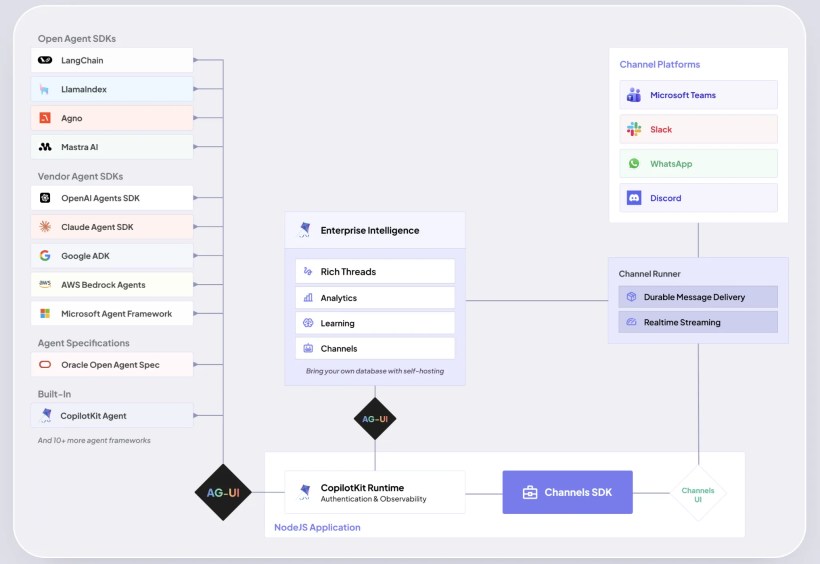
The SDK Channels from CopilotKit is an MIT‑licensed open source library that lets you run any AG‑UI agent directly inside messaging platforms such as Slack and Microsoft Teams. With a single click, developers can turn their existing bot into a collaborative assistant without having to rewrite the user interface.
Main Features
The tool provides an abstraction layer that handles connection to the Slack or Teams APIs, message routing, and context persistence. It also includes a simplified state manager for real‑time conversation tracking.
Technical Architecture
The architecture relies on two npm packages: @copilotkit/channels, which contains the communication middleware, and @copilotkit/runtime, which orchestrates model execution. Agents remain unchanged while the SDK takes care of translating messages into the formats required by each platform.
Installation & Configuration
Installation is straightforward: npm install @copilotkit/channels @copilotkit/runtime. After obtaining a Slack or Teams authentication token, simply declare the environment in your .env file. The SDK provides initialization scripts that verify dependencies and create the necessary channels.
Practical Use Cases
Here are a few scenarios where SDK Channels delivers immediate value:
- Automated customer support in Slack, with hand‑off to a human agent if needed.
- Task management and deadline reminders via Microsoft Teams.
- Planned integration of a technical assistance chatbot into Discord.
“SDK Channels enables teams to quickly deploy intelligent agents without changing their existing workflows.” – CopilotKit
Compatibility & Future Roadmap
Currently, the SDK is in beta for Slack and Microsoft Teams. Developers can already test OAuth 2.0 authentication features and webhook handling. The roadmap includes Discord and Google Chat, as well as improved multimodal model support.
Conclusion & Next Steps
The SDK Channels opens a new era for AG‑UI agents, making their deployment in collaborative environments smoother than ever. To get started, download the GitHub repository, follow the installation guide, and integrate your agent in minutes.
Want to turn your bot into a workplace assistant? Download the SDK now and join the CopilotKit community to share feedback and ideas.


